🚀 External assistants: Share your assistants outside your organization
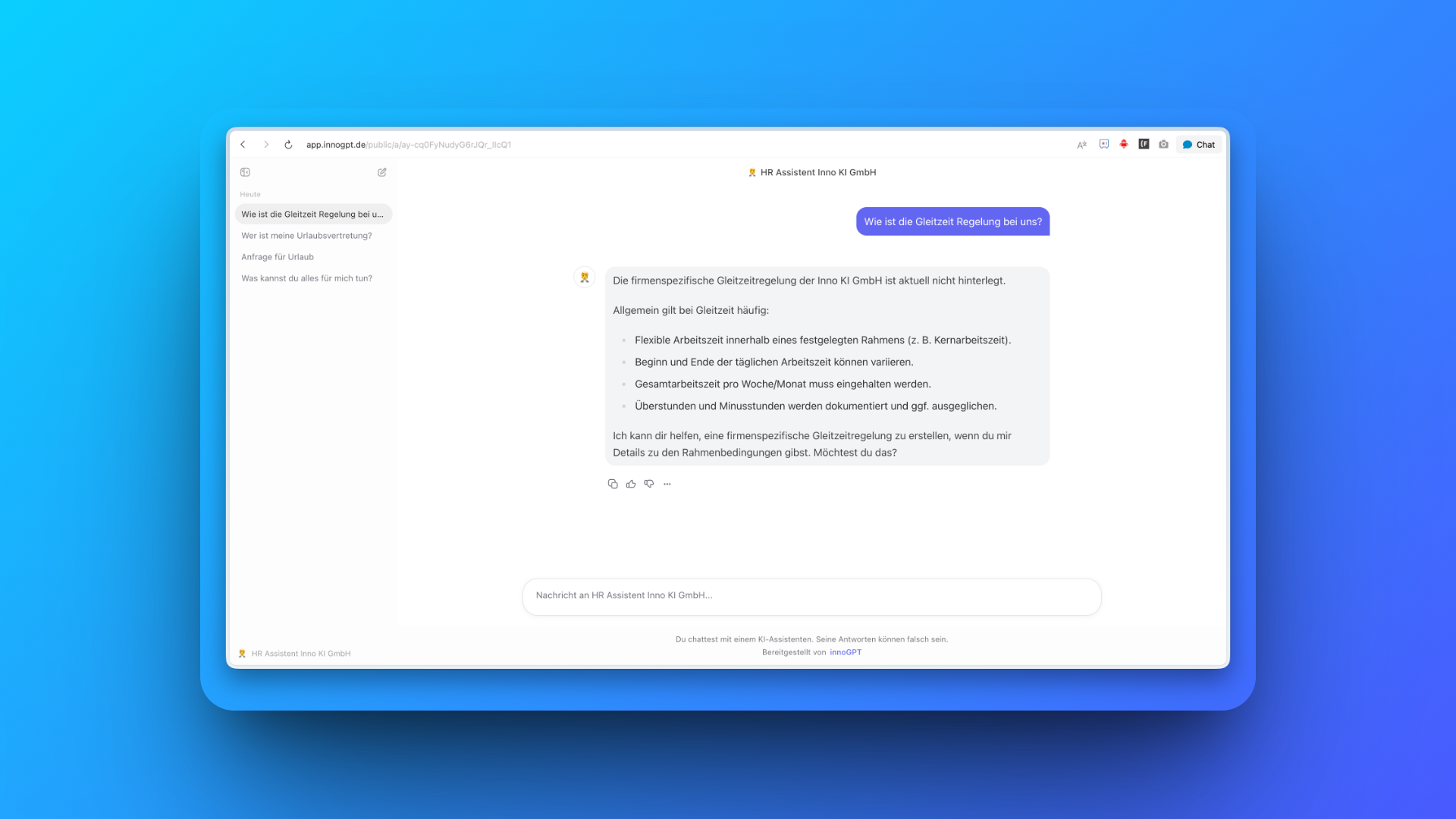
One for all: Make your assistants available externally. With their own URL, your branding and clear billing through the API.
Why external assistants?
Not everyone in a company has an innoGPT license. Many people do not need AI every day, only for certain tasks. They should still be able to work with an AI assistant.
That is exactly what external assistants are for. You make an assistant available outside your licenses and give it its own URL. That way anyone can reach it, for example embedded in the intranet. This keeps the core clean: people with a full license use all of innoGPT as usual. People without one get targeted access.
A real-world example: In manufacturing companies, not everyone has a license. You build an HR assistant, make it external and put it on the intranet. Employees can sort out simple questions about vacation, shifts or forms there, without a license of their own, just for the use cases they really need.
Core features
Own URL: Every external assistant gets a fixed address. Simply embed or share it.
Full control over access: You decide who can use the assistant.
Your branding: Design the assistant to fit your organization.
Billing through the API: Token usage is billed through the API.
Chats are only stored in the browser.
How it works
You select an existing assistant and make it available externally. In the next step, you set how access should be protected. Then you set up your customization and get your URL.
Real-world examples:
HR assistant for all employees: One place to go for HR topics, directly in the intranet.
Customer assistant: Open a chat for your customers, without them signing in to your platform.
Which customization options do you have?
You decide how open the assistant should be:
Require email first: You see which address someone uses to access it.
Password protection: Only invited people can get in.
IP restriction: Allow access only from your internal network.
Control features: Turn web search on or off, allow or block file uploads, and much more…
What does this mean for you?
One assistant, many users. You build it once and make it available to your whole team or your customers. No extra licenses, no technical effort.
We look forward to your feedback! 🙌
More improvements:
Sign-in and sessions are more stable: They are no longer cut off early during long requests, and they stay active during short outages of the login provider.
Your Google connection stays active more often. Brief errors no longer lead to an unnecessary prompt to sign in again.
Minor improvements to the workspace settings (more space, tidier layout).
Public assistants no longer wrongly require sign-in, and stored knowledge files load reliably.
Shared assistant pages are no longer indexed by search engines.
Reference images for video generation are checked before the start. Images that are too small are rejected with a clear error message.
Videos that Sora rejects for moderation reasons are now correctly canceled.
Error messages for reference images in video generation are now also available in Spanish, French, Italian and Dutch.
PDF files are processed more reliably when you upload them.
The PDF viewer now works reliably in Safari 16.
XLSX templates are now filled in reliably.
Large generated files can be downloaded directly without opening the preview.
The duplicate close button in the file preview has been removed.
The audio check for meetings now clearly shows that only the microphone is checked.
AI requests to models that do not support the “Temperature” parameter no longer fail.
An error from the AI provider is no longer wrongly shown as an expired session.
Partner admins can send invitations again.
Failed chat answers are now correctly shown as errors, so the chat no longer reloads endlessly.
innoGPT Standard accepts attachments such as files and images again.
Faulty generated course content in the Academy is now displayed correctly.
Fixed display errors on some buttons.
Automations of a removed member are now reliably stopped.
Broken favicons in source citations are no longer shown permanently.
Automations of active members are no longer wrongly paused.